
FAQs
Find quick answers to the most common questions.

TodayTvSeries WebSite
TodayTvSeries was launched in 2016 with a simple goal: to make TV series more accessible to people in parts of the world where access to television networks, affordable internet, or high-speed connections can be limited. From the beginning, our team focused on creating video files with a good balance between video quality and file size. We originally specialized in 480p releases with very small file sizes, making them easier to download even with limited internet connections. As our users requested higher quality, we expanded our releases to 720p and 1080p, while continuing to focus on keeping file sizes as low as possible without unnecessarily sacrificing quality.
Over the years, we have developed and refined our own encoding approach and settings specifically for our releases. Our goal has always been to make the experience as simple and accessible as possible, without requiring users to pay for a subscription to use our website.
We also encourage users who have access to official streaming services or subscriptions to support the original creators and production teams by watching and subscribing through official platforms whenever possible.
The official TodayTvSeries website is currently available through these two official domains:
Official Domains:
TodayTvSeries1.COM
TodayTvSeries6.COM

Over more than 10 years of serving our users, there have been websites and individuals who have attempted to use the TodayTvSeries name without being affiliated with our team. Some may copy our name, branding, or content, so please be careful when accessing TodayTvSeries through search results or external links.
Always check the website address carefully before downloading anything. Our official domains are displayed below our videos and throughout our website.
If a website claims to be TodayTvSeries but uses a different domain, do not assume that it is operated by our team.
TodayTvSeries is built around one simple idea: providing a reliable, high-quality, and easy-to-use way to access TV series. Unlike many websites that simply collect or mirror files from other sources, our video releases are encoded and prepared by the TodayTvSeries team. We carefully optimize our releases to achieve the best possible balance between video quality and file size, using our own encoding experience and settings. We also provide dedicated file servers for our downloads, giving users direct access to video files rather than relying entirely on third-party file-hosting services. Over the years, we have built a large and continuously growing TV series archive, covering both popular and older shows. We also try to keep the download process as simple as possible, with clear links and minimal steps between finding an episode and downloading it. Finally, we believe that a good website is not only about its content. We continuously improve the design, usability, and overall browsing experience of TodayTvSeries so that finding and downloading your favorite shows remains simple and enjoyable.
In short: TodayTvSeries
 Combines our own video encoding
Carefully optimized file sizes
Dedicated download infrastructure
Large archive
Continuously improved user experience
— all in one place.
Yes, TodayTvSeries has been free to use since the day we launched, and it will remain free. You can visit our website and enjoy your favorite TV series without paying for a subscription or membership. You do not need to create an account to use TodayTvSeries. You can access and use all available features of our website as a guest, without registration or membership.
Yes, TodayTvSeries is designed to provide a smooth and user-friendly experience across different devices. You can access our website using your smartphone, tablet, laptop, or desktop computer and easily browse TV series, find episodes, and access available downloads. Our responsive design automatically adapts to different screen sizes, so you can enjoy TodayTvSeries wherever you are.
Running and maintaining a website like TodayTvSeries comes with ongoing costs, including servers, storage, bandwidth, development, and maintenance. For this reason, we use advertisements to help cover these costs and keep the website available to everyone for free. We always try to keep advertisements as unobtrusive as possible and minimize their impact on your browsing and downloading experience. We appreciate your understanding and support.
How to Use TodayTvSeries?
Finding your favorite TV series is easy. You can use the search bar at the top of the website to quickly find the show you are looking for.

If you are not looking for anything specific and simply want to discover something new, visit our TV Series section, where you can explore a wide selection of popular and highly-rated shows. Once you find a series, simply open its dedicated page. You can check the available information and watch the trailer before deciding whether the series matches your taste.
Once you have selected a TV series, open its dedicated page and find the season containing the episode you want. In the episode table, choose the Download Button for your preferred video quality.
You will then be taken through the simple 3-Step GOShortLink process, which helps support the operation and maintenance of TodayTvSeries. After completing the process, your selected episode will be downloaded automatically to your device as a compressed RAR file.
You can then extract the video file and start watching.
Our episodes are provided in RAR format, a compressed archive format that helps us package and distribute our video files efficiently.
We also use this format as part of our file-delivery system to make it more difficult for other websites to directly copy and redistribute our video files.
Once the download is complete, simply extract the RAR archive to access the MKV video file and the accompanying TodayTvSeries.txt file.
No special conversion is required — after extraction, the MKV file is ready to play.
A RAR file is a compressed archive that can be easily extracted on most devices.
On Windows and macOS, you can use applications such as WinZip or WinRAR to extract the files.

On Android and iPhone/iPad, you can usually open and extract RAR archives using a compatible file manager or archive application. Depending on your device and operating-system version, you may need to install a dedicated archive app if the built-in file manager does not support RAR files.
Each TodayTvSeries RAR archive normally contains the video file and a TodayTvSeries.txt file.
Our videos are encoded using the x265 / HEVC format, so we recommend using a modern media player with proper HEVC support.
On Windows and macOS, KMPlayer is one of our recommended options. VLC Media Player is another popular choice that supports x265 / HEVC playback.

On Android, iOS Phones and Tablets, you can use popular players such as MXPlayer or KMPlayer, provided that your device supports HEVC playback.

If a video does not play correctly, make sure you are using an up-to-date media player with x265 / HEVC support.
Since 2020, we have been providing subtitles with our TV series episodes whenever subtitles are available. After opening the video in a compatible media player, you can usually access the Subtitle menu and select the language you prefer. The number of available subtitle languages depends on the subtitles provided for that particular series and episode.

If your preferred language is not available, you can search for an external subtitle by searching for the series name, season number, episode number, and “subtitle” on Google or other search engines.
Some episodes may not include subtitles in your preferred language. Don't worry — you can easily add an external subtitle to the video.
Search for the series name, season number, episode number, and “subtitle” using Google or another search engine. There are specialized subtitle websites that provide subtitle files for many TV series. Sample : Game of Thrones S01E01 Subtitle
When downloading an external subtitle, pay attention to the release source listed in its name.
You may see labels such as WEB WEB-DL WEBRip or Blu-ray. Try to download a subtitle that matches the source of your video.
For example, if your video is a WEB-DL release, look for a subtitle specifically marked WEB-DL whenever possible. Using a subtitle from a different release source may cause timing or synchronization problems, even when the season and episode are correct.
After downloading the subtitle file, open the video in your media player and either use the player's Subtitle → Add/Open Subtitle option or simply drag and drop the subtitle file onto the video window, if your media player supports this feature.
Most subtitle files are very small, so they can be downloaded quickly.
The Best Quality for you depends on your device, screen size, available storage, and internet connection
720p is a great choice if you are watching on a smartphone, tablet, laptop, or another device with a smaller screen, or if you have limited storage or bandwidth.

If you are watching on a Desktop Computer or TV, we recommend our 1080p releases for a sharper and more detailed viewing experience.

If you are unsure which one to choose, 720p offers a great balance between quality and file size, while 1080p is the better choice when maximum picture quality is your priority.
Video Quality & File Formats
x264 is an encoder used to compress video using the H.264 / AVC video compression standard.
H.264 has been widely used for many years and is supported by a very large range of devices, operating systems, and media players.
It can provide very good video quality while keeping file sizes relatively reasonable, which is why it has been one of the most widely used video encoding formats.
x265 is an encoder used to compress video using the H.265 / HEVC (High Efficiency Video Coding) standard. HEVC is a newer and more efficient video compression standard than H.264. It is designed to maintain high image quality while requiring less data when properly encoded. This makes x265 particularly useful for high-quality video releases where keeping the file size as small as possible is important.
TodayTvSeries uses x265 / HEVC encoding for its releases to achieve a strong balance between video quality and file size.
The main difference between x264 and x265 is their video compression efficiency.
x264 uses the H.264 / AVC standard, while x265 uses the newer H.265 / HEVC standard. With comparable visual quality, x265 can generally achieve a smaller file size than x264. This means an x265 release can provide high-quality video while using less storage space and bandwidth. However, x265 requires more processing power to encode and may also require a compatible device or media player for smooth playback.
In simple terms:
x264 → Older, widely compatible, larger files
x265 → Newer, more efficient, smaller files
These labels describe the source of a video, rather than simply its resolution.
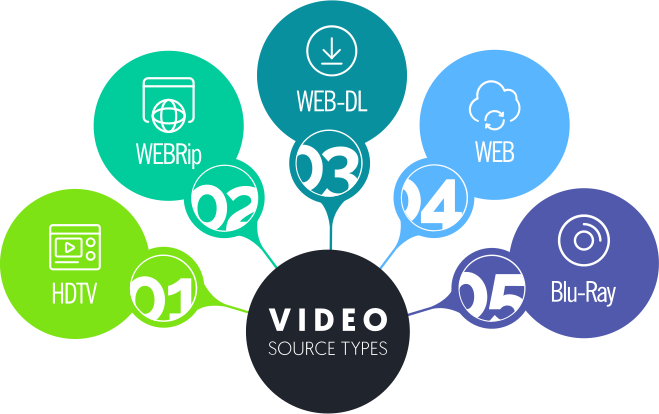
HDTV — A video sourced from a television broadcast. The quality can vary depending on the original broadcast and the way it was captured or processed.
WEBRip — A video captured or processed from an online streaming source. Its quality can vary depending on the source and the capture or encoding process.
WEB-DL — A video obtained directly from a digital streaming or online distribution service, without recording the video from the screen. It generally provides clean video and audio.
WEB — A general term indicating that the video comes from an online streaming or digital distribution source.
Blu-Ray — A video sourced from a Blu-ray disc. These sources can contain a large amount of original video and audio data and are often used for high-quality releases.
There is no single source that is always the best, as the final quality depends on the original source, bitrate, encoding, and other technical factors.
In general:
Blu-ray sources can provide the highest overall source quality because they contain a large amount of original video and audio data.
WEB is a general source label and does not by itself indicate a specific level of quality.
WEB-DL releases can also provide excellent quality and are often a great choice when you want high-quality video with a more reasonable file size.
WEBRip quality can vary depending on how the source was captured and processed.
HDTV quality depends heavily on the original television broadcast and its recording quality.
Remember that the source is only one part of the final quality. The resolution, bitrate, encoding settings, and compression used afterward can all affect the final video.
Ads & Ad Blocker
TodayTvSeries is a free website, and advertisements help us cover the ongoing costs of running and maintaining the service.
If you are using an ad blocker, it may prevent some advertising resources from loading correctly. When this happens, our website may not be able to confirm that the required advertising content has been loaded, and you may see an ad blocker warning or experience problems accessing the download process.
We understand that advertisements can sometimes be inconvenient, and we always try to keep them as unobtrusive as possible. However, if you would like to continue using TodayTvSeries for free, we kindly ask you to disable your ad blocker for our website.
After disabling it, simply refresh the page and try again.
Thank you for your understanding and for helping us keep TodayTvSeries free for everyone. 
Advertisements are one of the ways we help cover the costs of running TodayTvSeries and keeping our downloads available to users for free.
When you click a download button, you may be taken through the GOShortLink process before reaching your selected file. This short process includes advertising and helps support the costs of our servers, storage, bandwidth, development, and website maintenance.
We have tried to keep the process as simple as possible, with only a few steps between selecting an episode and accessing your download.
Your support and patience help us continue providing TodayTvSeries free of charge. We truly appreciate it.
If you see an “Ad Blocker Detected” warning on TodayTvSeries, it does not necessarily mean that you have a traditional ad-blocking extension installed. There are several things that can prevent advertising resources from loading correctly.
Please try the following solutions:

 Check your Ad-Blocker
If you use an ad-blocking extension or application, temporarily disable it for TodayTvSeries and reload the page.
Check your VPN
Some VPN services include built-in ad-blocking, tracking protection, or DNS filtering. Check your VPN settings and temporarily disable these features, or try accessing the website without the VPN.
Check your Security Software
Some antivirus and Internet Security applications include features such as Web Protection, Web Shield, Ad Blocking, Tracking Protection, or DNS Filtering. These features may prevent advertising resources from loading.
Check your Browser
Some browsers have built-in privacy, tracking protection, or content-blocking features that can interfere with advertising resources. Check your browser's privacy and security settings, or try another browser to see whether the problem persists.
Check your DNS settings
Some DNS services block advertisements and tracking domains. If your device, router, or network is using a filtering DNS service, try switching to a reputable DNS provider that does not block advertising content, then reload TodayTvSeries and try again.
If you have checked all of the above and the “Ad Blocker Detected” warning is still appearing, don't worry. The problem may be related to your ISP or network configuration rather than your device. Please see the next question for additional troubleshooting steps.
Yes. In some cases, the problem may not be caused by your browser or device at all.
Advertising and tracking domains can be blocked at the DNS or network level. Some ISPs, routers, security services, and DNS providers can use filtering systems that block certain advertising or tracking domains before your browser can load them. DNS filtering can also be configured to block domains associated with advertisements, trackers, or other categories of content.
This means that you may have no ad blocker installed and no browser extension enabled, but TodayTvSeries may still detect that some required advertising resources cannot be reached.
How can I check if this is the problem?
The easiest test is to connect to the internet through a different network. For example, if you are using your home ISP, try connecting through mobile data or another Wi-Fi connection.
If the warning disappears when using another network, this may indicate that the original network, ISP, router, or DNS configuration is responsible.
You can also try changing your DNS
Your device or router may be using the DNS servers provided by your ISP. You can try a different public DNS service, such as Google Public DNS or another reputable DNS provider.
Some DNS services are specifically designed to block advertisements and trackers, so avoid using an ad-blocking DNS service when troubleshooting this problem. DNS filtering can intentionally prevent advertising domains from resolving. After changing your DNS settings, restart your connection or clear the DNS cache on your device, then reload TodayTvSeries and test the download again.
Important: DNS problems can vary by ISP, country, router, and network configuration. Changing DNS is therefore a troubleshooting step, not a guarantee that every connection will behave the same way.
If TodayTvSeries works normally on one internet connection but shows an ad-blocker warning on another, the difference between the two networks is an important clue.
Download Problems & Troubleshooting
If you have followed the instructions above and are still unable to download the episode, please don't worry. The problem may require us to check the specific episode or download link from our side. If the problem is related to a specific Link, RAR file, or Video, you can also use our Corrupt File Report form below the website. Please contact us through our Contact form or our official Telegram channel and provide the series name, season number, and episode number whenever possible.
We will check the reported problem and take the necessary action whenever possible. Thank you for helping us keep TodayTvSeries working smoothly for everyone.
When you click the Download button on TodayTvSeries, you will be taken through the three-step GOShortLink process. After completing all three steps, your selected file should automatically begin downloading.
We also provide a step-by-step video tutorial on the website that shows the entire download process.

If the download does not start after you have successfully completed the GOShortLink steps, the problem may sometimes be related to the availability of the file server domain or GOShortLink domain in your region. In some countries or networks, access to one of these domains may be restricted or unstable.
As a quick test, you can try using a reputable VPN connection and then repeat the download process. If the download works normally with the VPN enabled, this may indicate that the issue is related to regional access to one of the domains.
If the problem continues, please let us know through our Contact form or our official Telegram channel so that we can check the issue and assist you.
A 404 error (File Not Found) means that the requested file or page could not be found at the specified address.

Because TodayTvSeries has been online since 2016 and contains a large archive, some older files may occasionally have availability issues.
In particular, some of our older 480p releases were previously stored on external archive services and may no longer be available or may have been moved. In other cases, we have moved files between our own servers over the years, and an old download link may contain an incorrect file path.
You do not need to troubleshoot this yourself. If you encounter a 404 error, please report the link using our Corrupt File Report form and select Link. Our team will check the reported episode and correct the link or replace the file when possible.
If your download starts normally but stops, fails, or does not complete, the problem may occasionally be related to a temporary connection issue or the file server hosting the episode. First, try downloading the file again. If the problem happens repeatedly with the same episode, please report it to us so we can check the file and its download link. If possible, please include the series name, season number, and episode number when contacting us. This allows us to locate and check the exact file more quickly.
Although we check our files before making them available, a very small number of files may occasionally become corrupted during compression, transfer, storage, or downloading. If a RAR file cannot be opened or extracted, first try downloading it again. If the second download produces the same problem, the issue may be with the file itself rather than your device.
In this case, please use our Corrupt File Report form below the website and select RAR as the type of problem. Include the series name, season number, and episode number, and our team will check the file and replace it when necessary.
If you find a problem with a download link, RAR file, or video, please report it using our Corrupt File Report form below the website.
Enter the series name, season number, and episode number, then select the type of problem you are experiencing:
Link — Select this if the download link does not work or the file cannot be accessed.
RAR — Select this if the downloaded RAR archive is corrupted or cannot be extracted.
Video — Select this if the RAR file opens correctly but the video itself has a problem.
Every report is checked by our team. If a file or link has a genuine problem, we will fix or replace it whenever possible.
Your reports help us keep the TodayTvSeries archive working correctly. Thank you for helping us!
If the audio and video are not synchronized, or an external subtitle appears too early or too late, the problem may be related to the specific video release or subtitle file. First, make sure that you are using a subtitle that matches the same release source as your video, such as WEB, WEB-DL, WEBRip, or Blu-ray. If the video itself has an audio or synchronization problem, try playing it with another compatible media player to make sure the issue is not related to the player.
If the problem continues with the same episode, please report it using our Corrupt File Report form and select Video so our team can check the file.
If a video freezes, stops, or crashes at a specific point during playback, first make sure you are using a media player that properly supports x265 / HEVC video. You can also try playing the same file with another compatible media player to determine whether the problem is related to the player. If the video consistently freezes or crashes at the same point, even when using different compatible players, the video file may have a problem.
In that case, please use our Corrupt File Report form and select Video. Include the series name, season number, and episode number so our team can check the exact release.
Requests, Partnerships & Support
TodayTvSeries has always been free to use, and there are several ways you can support us and help keep the website running.
 Financial Support
If you are able to, financial contributions can help us cover the ongoing costs of servers, storage, bandwidth, development, and website maintenance.
 Allow our Advertisements
If you use an ad blocker, consider disabling it for TodayTvSeries. Advertising is one of the ways we help cover the costs of keeping the website and its downloads available for free.
 Share TodayTvSeries WebSite
One of the simplest ways to support us is by sharing the official TodayTvSeries website with your friends and followers on social media. This helps more people discover the website and find the correct official address.
Every form of support, whether financial or simply sharing our website, is greatly appreciated and helps us continue our work. Thank you for being part of the TodayTvSeries community!
If you are interested in advertising on TodayTvSeries, business partnerships, sponsorship opportunities, or other professional collaborations, we would be happy to hear from you. You can contact us through the Contact form on our website, or reach our team directly by email: info[@]todaytvseries1.com

Please include as much relevant information as possible about your proposal so that our team can review it and get back to you.
We are always open to hearing about interesting opportunities and potential collaborations.
If you would like to request a TV series, suggest an improvement, report a general website issue, or contact our team about something else, you can use the Contact form on our website.

When requesting a TV series, please include the series name and, if possible, the release year or other information that can help us identify the correct show. For technical problems with a specific download link, RAR file, or video, please use our dedicated Corrupt File Report form instead. This allows us to identify and check the affected episode more quickly.
We appreciate your suggestions and feedback, and we always try to review user requests whenever possible.